When to Create a Deal Alert
Learn when Deal Alerts are most useful and how they can help you avoid constantly checking products you're interested in.
When to Create a Deal Alert
Not every product needs a Deal Alert—but for the right products, they're one of the most valuable tools in BrickSeek.
If you're waiting for the right opportunity instead of buying immediately, creating a Deal Alert can save you time and help ensure you don't miss important updates.
Waiting for a Better Price
Sometimes you know what you want—you just don't like today's price.
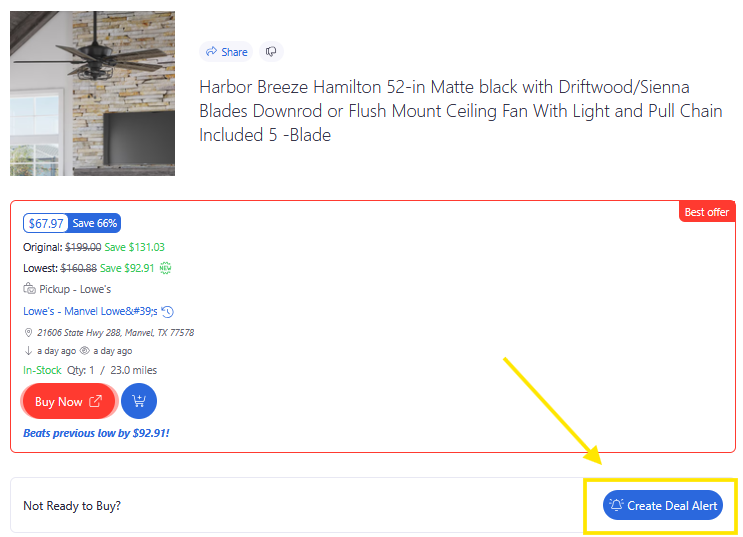
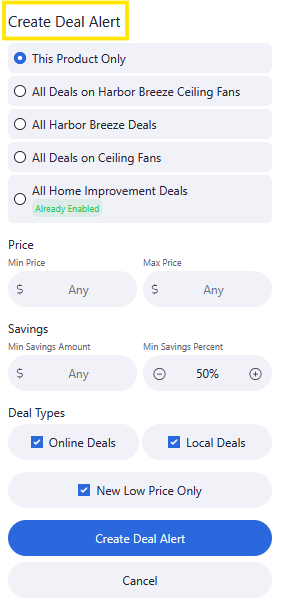
Instead of checking the product every day, create a Deal Alert and let BrickSeek notify you when something meaningful changes.
Watching Hard-to-Find Products
Popular products can sell out quickly or become available without much notice.
A Deal Alert lets BrickSeek keep an eye on the product for you, helping you stay informed without constantly checking back.
Planning Future Purchases
Maybe you're shopping for:
- Holidays
- Birthdays
- Home improvement projects
- Seasonal items
Creating a Deal Alert allows you to start planning now while BrickSeek watches for updates in the background.
Pair Deal Alerts with Shopping Lists
Shopping Lists and Deal Alerts work even better together.
A simple workflow is:
- Save the product to your Shopping List.
- Create a Deal Alert.
- Wait for a notification.
- Review the Product Page.
- Make your purchase.
- Mark the item as purchased.
This keeps your shopping organized while allowing BrickSeek to monitor products on your behalf.
Pro Tips
💡 Create alerts for products you're willing to wait on—not everything you browse.
💡 Remove alerts once you've made your purchase.
💡 Use Shopping Lists to organize products and Deal Alerts to monitor them.
💡 Let BrickSeek do the checking for you instead of revisiting the same Product Page every day.
Frequently Asked Questions
Should I create a Deal Alert for every product?
Probably not. Deal Alerts work best for products you're genuinely interested in purchasing but aren't ready to buy today.
Can I have a Shopping List item without a Deal Alert?
Absolutely. Many products don't need active monitoring.
Can I create a Deal Alert without adding the product to my Shopping List?
Yes. These are separate features, and you can use either one independently.
Related Lessons
- Using Deal Alerts
- Using Shopping Lists
- Marking Products as Purchased
- Understanding the Savings Tracker