Using Shopping Lists
Learn how Shopping Lists help you save products, organize future purchases, and quickly return to items you're interested in.
Using Shopping Lists
Not every great deal needs to be purchased immediately.
Shopping Lists make it easy to save local, in-store products you're interested in so you can quickly return to them later.
Whether you're planning a future purchase, comparing products, or waiting for the right time to buy, Shopping Lists help keep everything organized in one place.
Why Use a Shopping List?
As you browse BrickSeek, you'll probably come across in-store products you don't want to forget.
Instead of bookmarking pages or searching again later, simply save the in-store product to your Shopping List.
Your Shopping List becomes your personal collection of products you're watching or planning to purchase.
Adding Products
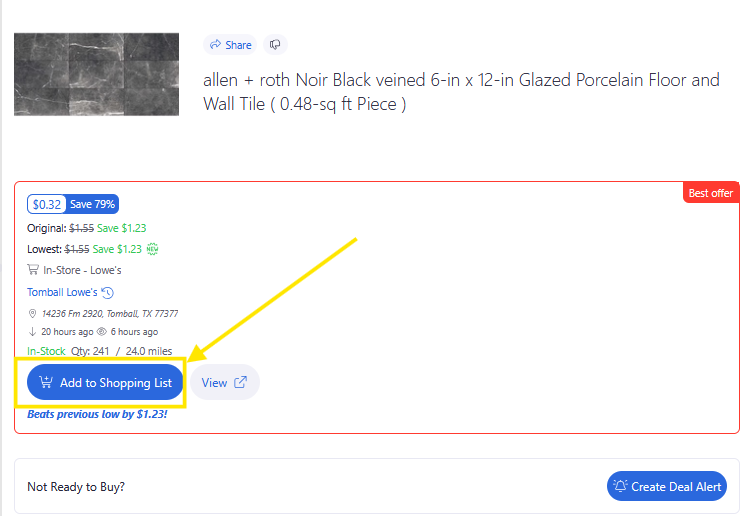
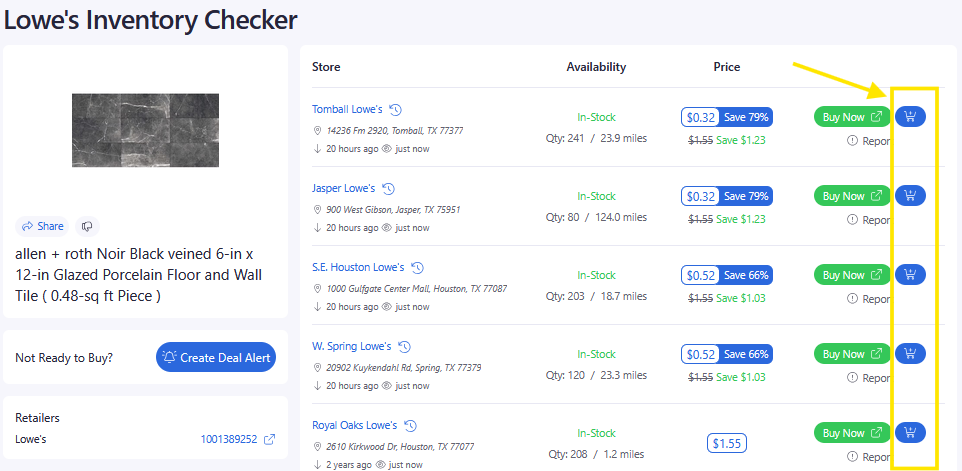
You can add local, in-store products to your Shopping List from several places throughout BrickSeek.
Depending on the page you're viewing, you'll find an Add to Shopping List option that saves the product to your account.
Once added, you can return to it whenever you're ready.
Reviewing Your List
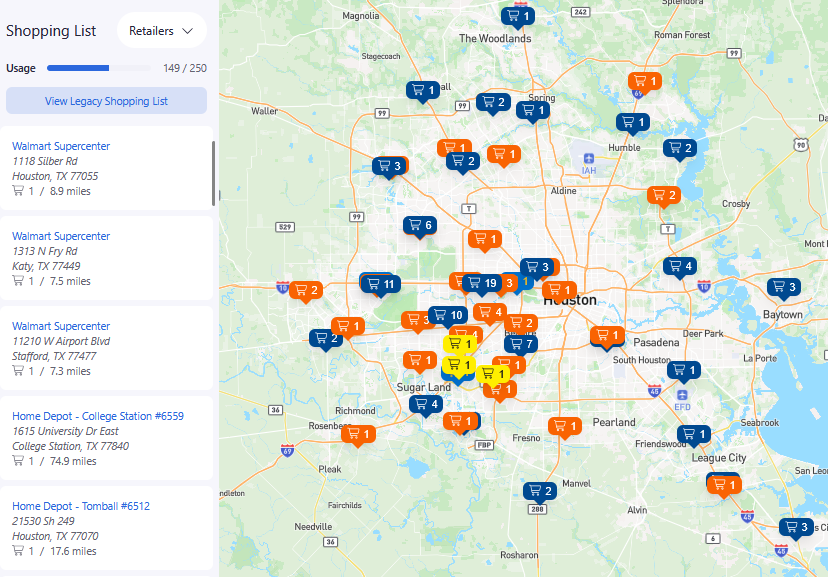
Your Shopping List displays all of the products you've saved.
From here you can quickly:
- Open the Product Page
- Launch an Inventory Checker
- Review current pricing
- Remove products you no longer need
- Mark products as purchased
Keeping everything together makes it easy to continue shopping where you left off.

Keep Your List Organized
Shopping Lists work best when they're kept up to date.
As you purchase products or lose interest in certain items, you can remove them or mark them as purchased to keep your list focused on what matters most.
Pro Tips
💡 Save products even if you're not planning to buy today.
💡 Shopping Lists are great for seasonal purchases and holiday shopping.
💡 Use your Shopping List as a starting point each time you visit BrickSeek.
💡 Review saved products regularly to see if pricing or availability has changed.
Frequently Asked Questions
Is there a limit to how many products I can save?
Your Shopping List is designed to help you organize the products you're interested in. Membership limits, if any, depend on your account type.
Can I remove products later?
Absolutely. You can remove products from your Shopping List at any time.
Does saving a product notify me about price changes?
No. Shopping Lists help you organize products you're interested in. If you'd like to be notified about changes, create a Deal Alert for that product.
Related Lessons
- Marking Products as Purchased
- Using Deal Alerts
- Understanding the Savings Tracker
- Understanding Product Pages