Using Deal Alerts
Learn how Deal Alerts notify you when products you're watching have meaningful changes, helping you stay informed without constantly checking BrickSeek.
Using Deal Alerts
You don't have to keep checking BrickSeek to see if something has changed.
Deal Alerts monitor products you're interested in and notify you when meaningful updates occur, helping you stay informed even when you're away.
Whether you're waiting for a better price, improved availability, or simply keeping an eye on a product, Deal Alerts help you stay connected.
Why Use Deal Alerts?
Sometimes today isn't the right time to buy.
Instead of checking the same product every day, create a Deal Alert and let BrickSeek do the monitoring for you.
Deal Alerts are perfect when you're:
- Waiting for a better opportunity.
- Researching a future purchase.
- Shopping for seasonal items.
- Watching a high-demand product.
Creating a Deal Alert
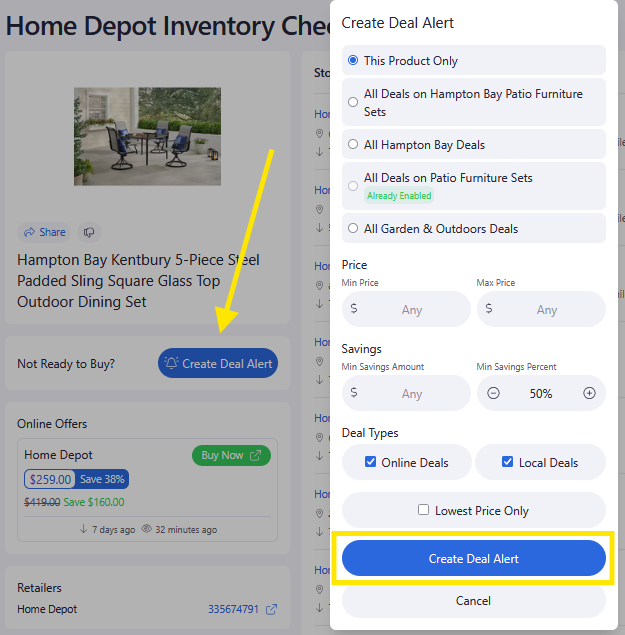
You can create a Deal Alert from multiple places throughout BrickSeek.
Depending on the feature you're using, simply select Create Deal Alert to begin monitoring that product.
Current locations include:
- Product Pages
- Inventory Checkers
Creating an alert only takes a few seconds.

Managing Your Alerts
Your Deal Alerts page gives you a central place to review everything you're monitoring.
From there you can:
- Review active alerts
- Open the associated Product Page
- Remove alerts you no longer need
Keeping your alerts organized makes it easier to focus on the products that matter most.

Shopping Lists vs. Deal Alerts
These features work well together, but they serve different purposes.
Shopping List
Use this to organize products you're interested in in your Local Stores.
Deal Alert
Use this when you want BrickSeek to notify you about meaningful changes to a product you're watching.
Many members save products to their Shopping List and create a Deal Alert for the same item.
Pro Tips
💡 Create alerts for products you're willing to wait on.
💡 Remove alerts after you've made your purchase.
💡 Combine Deal Alerts with your Shopping List to keep your research organized.
💡 Review your active alerts occasionally to make sure you're only monitoring products you still care about.
Frequently Asked Questions
How many Deal Alerts can I create?
The number of alerts available depends on your membership level.
Will BrickSeek notify me automatically?
Yes. When a meaningful change occurs for a product you're monitoring, BrickSeek will notify you through your configured notification methods.
Should I use a Shopping List or a Deal Alert?
Use a Shopping List to organize products.
Use a Deal Alert when you want BrickSeek to notify you about changes.
Many members use both together.
Related Lessons
- Using Shopping Lists
- Marking Products as Purchased
- Understanding the Savings Tracker