Understanding Community Scores
Learn how Community Scores help you see what other BrickSeek members have reported for the same product at their local stores.
Understanding Community Scores
One of the most unique parts of BrickSeek is the ability to learn from other members.
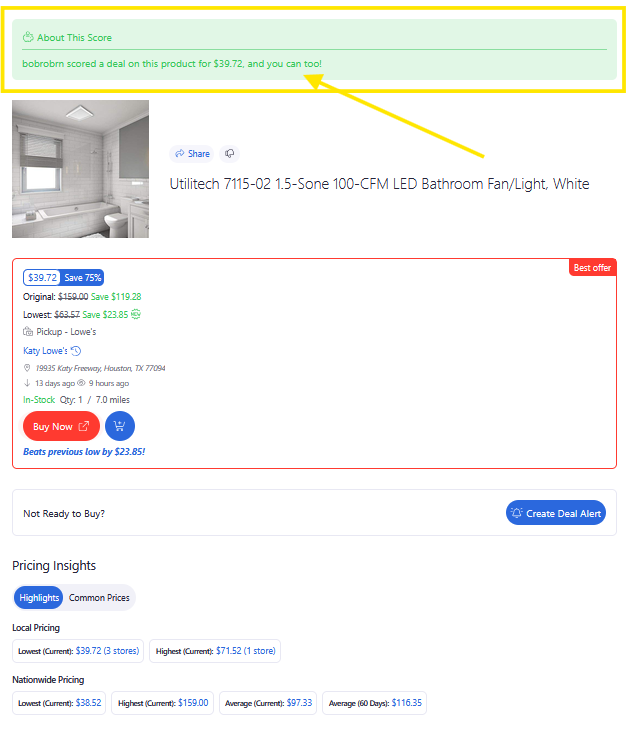
For some products, you'll see Community Scores, which are submitted by BrickSeek members who have reported what they found at their local stores or online.
These reports can provide additional context while you're deciding whether to pursue a deal.
What Are Community Scores?
Community Scores are member-submitted reports associated with a product.
Depending on what's available, you may see:
- Reported price
- Member score
- Date of the report
- Savings on that product
These reports help paint a broader picture of what other members have experienced.

Why Community Scores Are Helpful
Retail pricing can vary from retailer to retailer and one location to another.
Community Scores give you an opportunity to see what other BrickSeek members have found before making your own shopping trip or placing an online order.
While every store is different, these reports can provide useful real-world context.
Community Scores Are One Piece of the Puzzle
Community Scores should be used alongside the rest of the Product Page.
Before making a purchase, consider reviewing:
- Pricing Insights
- Local Offers
- Online Offers
- Inventory information
- The retailer's website
Looking at all available information helps you make the most informed decision.
Reports May Change Over Time
Community reports reflect what members found at a particular point in time.
Because retail pricing and inventory change frequently, newer reports may differ from older ones.
Always verify current pricing before visiting the store or placing an order.

Pro Tips
💡 More recent reports are generally the most useful.
💡 Community Scores work best when combined with Pricing Insights, Local and Online Offers.
💡 Remember that every store is unique, so your experience may differ from another member's.
💡 Always verify pricing before purchasing.
Frequently Asked Questions
Does every product have Community Scores?
No.
Community Scores are only available when BrickSeek members have submitted reports for that product.
Are Community Scores guaranteed to match my local store?
No.
Community Scores represent other members' experiences and may not reflect current pricing or inventory at your location or online.
Can Community Scores help me decide whether to visit a store?
Yes.
They provide additional context, but they shouldn't replace verifying the latest information before making a trip.
Related Lessons
- Understanding Product Pages
- Understanding Pricing Insights
- Comparing Local & Online Offers
- Using the View Button