Reporting an Issue
Learn how to report pricing, inventory, or product issues so our team can investigate and improve BrickSeek.
Reporting an Issue
We work hard to keep BrickSeek accurate and up to date, but retailer pricing, inventory, and product information can change quickly.
If you notice something that doesn't look right, you can report it directly from BrickSeek. Every report helps us investigate potential issues and improve the experience for everyone.
When Should You Report an Issue?
You should report an issue if you notice something that appears incorrect or isn't working as expected.
Examples include:
- Incorrect pricing
- Inventory that appears inaccurate
- Product information that doesn't match the retailer
- Missing or incorrect product details
- Features that aren't working properly
- Other unexpected behavior
Not every difference is an error, but we'd much rather investigate than leave a potential issue unresolved.
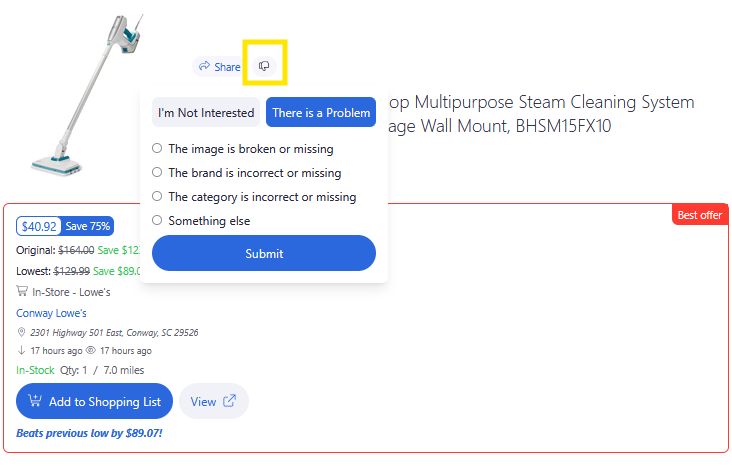
How to Submit a Helpful Report
The more information you include, the easier it is for our team to investigate.
Helpful details include:
- What you expected to happen
- What actually happened
- The retailer involved
- The store location (for local inventory issues)
- Any additional information that may help reproduce the issue
Clear, detailed reports help us resolve issues more quickly.

What Happens After I Submit a Report?
Once submitted, your report is reviewed by the BrickSeek team.
Depending on the issue, we may:
- Confirm the reported issue
- Identify changes made by the retailer
- Correct product information
- Improve the platform based on your feedback
While we may not respond to every individual report, every submission is reviewed and helps make BrickSeek better.
Pro Tips
💡 Double-check the retailer's website before reporting a pricing difference.
💡 Include as much detail as possible.
💡 Mention the store location when reporting local inventory issues.
💡 A screenshot can be helpful when available.
Frequently Asked Questions
Will someone respond to my report?
Every report is reviewed by our team, but we may not be able to respond individually to every submission.
Can I report feature bugs?
Absolutely. If something isn't working as expected, we'd like to hear about it.
Should I report inventory differences?
Yes. Retail inventory changes frequently, but if something appears incorrect, submitting a report helps us investigate.
Related Lessons
- Managing Your Account
- Managing Notifications
- Understanding Inventory Results
- Understanding Product Pages