Membership & Billing
Membership & Billing
Membership & Billing
Your BrickSeek membership gives you access to powerful tools that help you discover incredible deals and save money.
This lesson explains where to find your membership information, how to manage your subscription, and where to go if you have questions about billing.
Viewing Your Membership
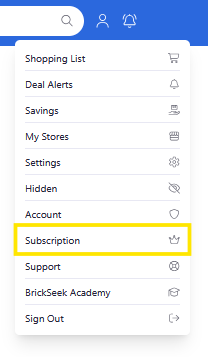
Your membership details are available from your Subscription page.
Depending on your current plan, you may be able to view information such as:
- Your current membership
- Renewal or billing information
- Subscription status
- Available account options
Managing Your Subscription
If you need to review or make changes to your subscription, start by visiting your Account page from the website (not the app).
From there, you can access the available membership and billing options associated with your account.
As BrickSeek continues to evolve, additional membership features and options may become available.

Need Help?
If you have questions about your membership or experience a billing issue, our support team is here to help.
Before reaching out, it's a good idea to review your Subscription page, where you'll often find the information you're looking for.
If you still need assistance, contact BrickSeek Support for additional help.
Pro Tips
💡 Review your membership details occasionally so you're familiar with your current plan.
💡 Keep your payment information up to date to avoid interruptions to your membership.
💡 Visit your Account page first if you have questions about your subscription or renewal.
Frequently Asked Questions
Where can I view my membership?
Your membership information is available from your Subscription page after signing in from the website (not the app).
Can I upgrade or change my membership?
Yes. You can upgrade, downgrade, or cancel your membership at any time. Your account and saved data stay with you, so you can choose the plan that best fits your shopping needs.
Where can I view my billing information?
Your Subscription page on the website (not the app) contains your available billing and subscription information.
Who should I contact if I have a billing problem?
If you can't resolve your question from your Subscription page, contact BrickSeek Support ( support@brickseek.com ) for assistance.
Related Lessons
- Managing Your Account
- Managing Notifications
- Reporting an Issue