Marking Products as Purchased
Learn what happens when you mark an item as purchased and how it helps keep your Shopping List organized while contributing to your Savings Tracker.
Marking Products as Purchased
When you purchase an item you've saved, don't just leave it sitting in your Shopping List.
Marking a product as Purchased helps keep your Shopping List organized while recording your purchase in your Savings Tracker.
It's a simple step that helps you track what you've bought and the savings you've achieved over time.
Why Mark Products as Purchased?
Your Shopping List is designed for products you're still considering.
Once you've completed a purchase, marking the item as purchased helps separate completed purchases from products you're still watching.
It also records the purchase in your Savings Tracker, giving you a running history of your savings.
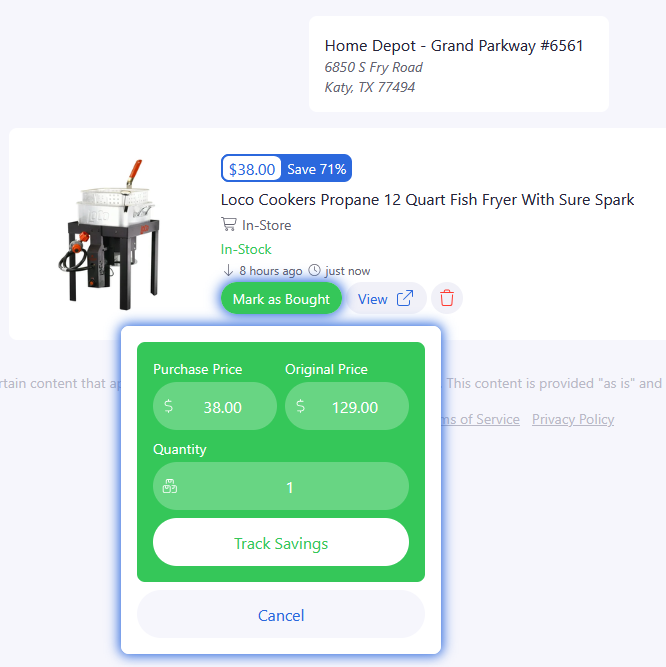
What Happens Next?
After marking a product as purchased:
- The item is removed from your active Shopping List.
- The purchase is recorded in your Savings Tracker.
- Your Shopping List stays focused on products you're still interested in.
Depending on your connected community features, your purchase may also be eligible to appear in community activity, helping celebrate great finds with other members.
Why This Matters
Shopping Lists are for future purchases.
Savings Tracker is for purchases you've already made.
Moving products from one to the other helps BrickSeek become more than a deal finder—it becomes a record of the value you've received from your membership.

Pro Tips
💡 Mark purchases shortly after buying them to keep your Shopping List organized.
💡 Review your Savings Tracker occasionally to see how much you've saved over time.
💡 Continue using your Shopping List for products you're still researching or waiting to purchase.
💡 Pair Shopping Lists with Deal Alerts to stay informed about products you're watching.
Frequently Asked Questions
Does marking a product as purchased delete it?
No. It removes the item from your active Shopping List and records it in your Savings Tracker.
Can I still view products I've purchased?
Yes. Purchased items become part of your Savings Tracker, where you can review your purchase history and savings.
Related Lessons
- Using Shopping Lists
- Understanding the Savings Tracker
- Using Deal Alerts