Managing Your Deal Alerts
Learn how to review, organize, and remove Deal Alerts so you're only monitoring the products that matter to you.
Managing Your Deal Alerts
Your shopping priorities change over time, and your Deal Alerts should too.
The Deal Alerts page gives you a central place to review the products you're monitoring so you can keep everything organized and focused on what matters most.
Viewing Your Alerts
The Deal Alerts page displays every product you're actively monitoring.
From here you can quickly:
- Review active alerts
- Open the associated Product Page
- See the products you're waiting on
- Remove alerts you no longer need
Keeping your list current makes it easier to focus on the products that are most important to you.

Modifying An Existing Alert
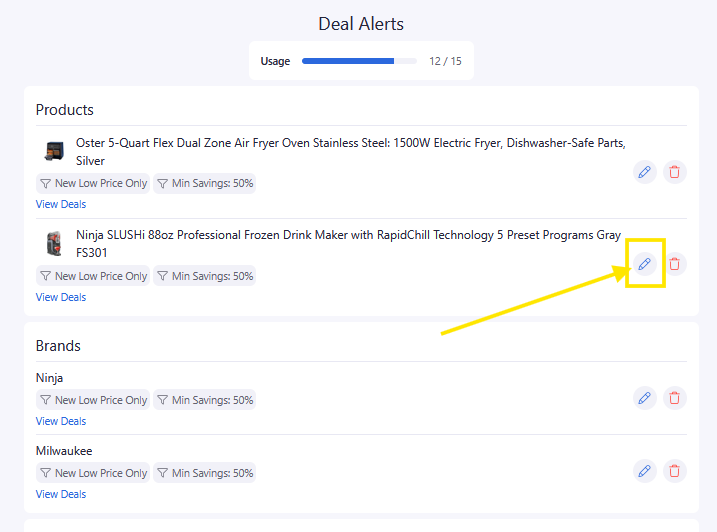
It is simple to modify an existing alert's criteria from the Deal Alerts Summary page.
Click the pencil icon for the alert.
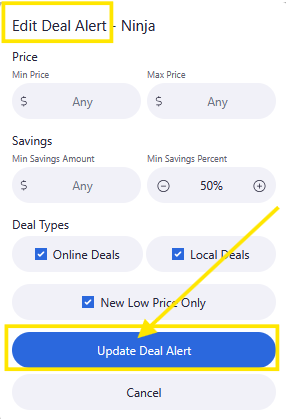
From Edit Deal Alert pop-up, adjust or change
- Price range, if wanted
- Savings range, if wanted
- Deal Types - Online, Local or New Low Price
- Click the blue Update Deal Alert
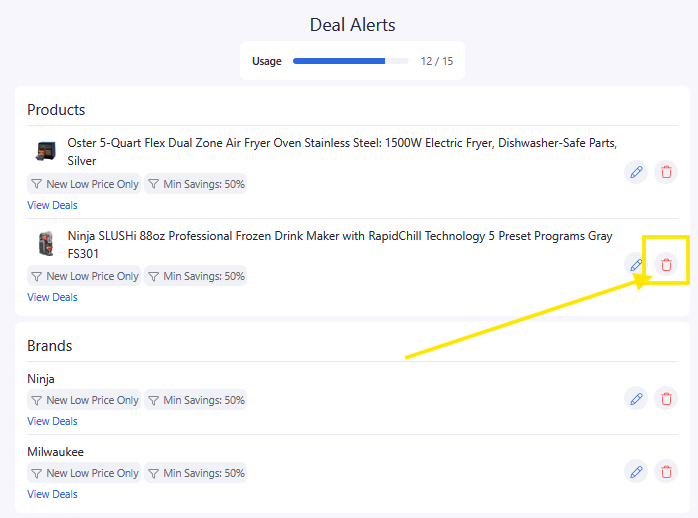
Remove Alerts You No Longer Need
Once you've purchased a product—or simply decide you're no longer interested—you can remove the alert.
Cleaning up old alerts helps ensure future notifications stay relevant.
Keep Alerts Focused
A well-maintained list of alerts is often more valuable than monitoring dozens of products you'll never purchase.
As your shopping needs change, take a few moments to review your alerts, modify or remove products that are no longer relevant.
Pro Tips
💡 Remove alerts after completing your purchase.
💡 Review your alerts periodically to keep them organized.
💡 Continue using your Shopping List for products you're researching and Deal Alerts for products you're actively monitoring.
💡 Don't be afraid to create a new alert later if your plans change.
Frequently Asked Questions
How do I stop receiving notifications?
Simply remove the Deal Alert from your active alerts list.
Can I create another alert later?
Absolutely. You can create a new Deal Alert for the same product whenever you want.
Does removing a Deal Alert remove the product from my Shopping List?
No. Shopping Lists and Deal Alerts are separate features. Removing an alert does not remove the product from your Shopping List.
Related Lessons
- Using Deal Alerts
- When to Create a Deal Alert
- Using Shopping Lists
- Understanding the Savings Tracker