Managing Your Account
Learn where to find your account settings, update your information, and manage your BrickSeek account.
Managing Your Account
Your BrickSeek account is where you can manage your personal information, review your membership, and access settings that help personalize your experience.
While you may not visit your account settings every day, knowing where to find them makes it easy to keep your information current and manage your membership when needed.
Accessing Your Account
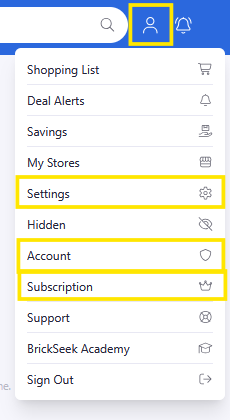
After signing in, from the Navigation menu you can view important account information and manage settings related to your BrickSeek experience.
Keeping Your Information Up to Date
Keeping your account information current helps ensure you receive important communications and can continue using BrickSeek without interruption.
Depending on the available settings, you may be able to review or update information such as:
- Email address
- Home Location
- Notification Preferences
- Billing Information (on the website)
- Other account details
Your Membership
Your Subcription page is also where you'll find information about your BrickSeek membership.
From here, you can review your current plan and access other account-related information.
If you have questions about your subscription, visit the Membership & Billing lesson for more information.
Pro Tips
💡 Keep your email address up to date so you don't miss important account notifications.
💡 Use a strong, unique password to help protect your account.
💡 Review your account periodically to become familiar with new settings as BrickSeek continues to evolve.
Frequently Asked Questions
Where do I access my account settings?
After signing in, from the Navigation menu, select Settings, Account or Subscription.
Can I change my Home address?
Yes. From the navigation bar, select Settings then update with your new zip code or address.
Can I change my email address?
Yes. From the Navigation menu, select Account then update your email address.
Where can I see my membership information?
Your membership details are available from the Subscription link in the Navigation menu of on the BrickSeek website (not the app).
Related Lessons
- Managing Notifications
- Membership & Billing
- Reporting an Issue