Managing Notifications
Learn how BrickSeek notifications work and how to manage the updates you receive.
Managing Notifications
Notifications help you stay informed about the products, deals, and account activity that matter most to you.
Depending on your account settings and membership, BrickSeek may send notifications related to Deal Alerts, account updates, or important service announcements.
Understanding how notifications work helps ensure you never miss an opportunity.
Types of Notifications
BrickSeek may send notifications for a variety of reasons, including:
- Deal Alerts for products you're monitoring
- Important account updates
- Membership or billing notifications
- Product announcements and new features
Each notification is designed to keep you informed without requiring you to constantly check the website.
Managing Your Preferences
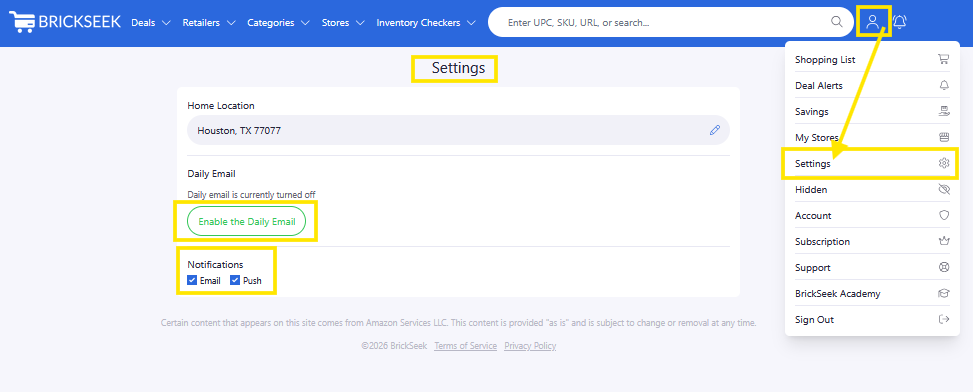
If notification preferences are available, you can customize which updates, and how you receive them, from your Account settings.
Take a few moments to review your preferences so you receive the information that's most valuable to you.
Stay Connected
To make sure you receive important notifications:
- Keep your email address up to date.
- Check your spam or junk folder if you're missing emails.
- Add BrickSeek to your email contacts or safe sender list if needed.
- If your preference is to receive Deal alert notifications to your phone, confirm that you have enabled push notifications on the BrickSeek app.
These simple steps can help ensure important updates reach your inbox.
Pro Tips
💡 Leave Deal Alert notifications enabled so you don't miss price drops or inventory changes.
💡 Review your notification settings occasionally as new options become available.
💡 If you're not receiving expected emails, check your spam or promotions folder first.
Frequently Asked Questions
Why didn't I receive a Deal Alert?
First, verify that your Deal Alert is still active. Confirm that your notification preferences are enabled. For email, check your email's spam or junk folder. For push notifications, confirm that they are enabled on your phone's app.
Can I turn notifications on or off?
If notification preferences are available for your account, they can be managed from your Account settings.
Are Deal Alert emails the same as account emails?
No. Deal Alert emails or app push notifications notify you about products you're monitoring, while account emails may include membership updates, service announcements, or other important information.
Related Lessons
- Managing Your Account
- Using Deal Alerts
- Membership & Billing