Getting the Most from Your Savings Tracker
Learn simple habits that help you build a complete savings history and get the most value from your Savings Tracker.
Getting the Most from Your Savings Tracker
The Savings Tracker becomes more valuable over time.
By developing a few simple habits, you'll build a more complete picture of your shopping history and the value you've received from BrickSeek.
Record Purchases Consistently
The best Savings Tracker is an accurate one.
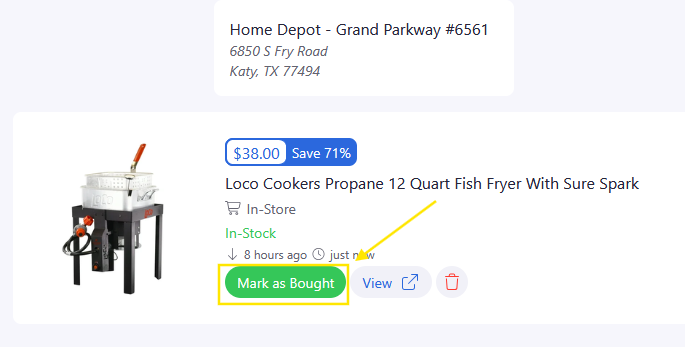
Whenever you purchase an item you've been watching, remember to mark it as Purchased from your Shopping List as well as when buying from a product page or inventory checker.
Doing this consistently helps ensure your Savings Tracker reflects your actual shopping activity.
Review Your Savings
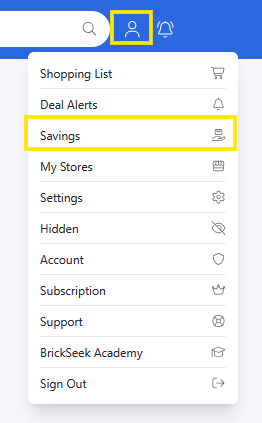
Every so often, take a few minutes to look back through your Savings Tracker.
It's a great way to:
- Review past purchases
- Remember successful finds
- See how your savings have grown over time
Many members are surprised by how quickly their savings add up.

Build a Complete Shopping Workflow
The Savings Tracker works best as part of your overall BrickSeek experience.
A simple workflow looks like this:
- Discover a product.
- Purchase it immediately from the item's product page or inventory checker
- Or save it to your Shopping List
- Create a Deal Alert if you're waiting for the right opportunity.
- Purchase the product.
- Mark it as purchased.
- Review it later in your Savings Tracker.
Each feature supports the next, making BrickSeek more useful every time you shop.
Pro Tips
💡 Mark purchases shortly after buying them.
💡 Keep your Shopping List organized so only active items remain.
💡 Review your Savings Tracker occasionally to see your progress.
💡 The more consistently you use BrickSeek's core features together, the more valuable your shopping history becomes.
Frequently Asked Questions
Why is my Savings Tracker empty?
Your Savings Tracker only records products you've marked as Purchased from your Shopping List, the item's product page or inventory checker.
Will older purchases appear automatically?
No. The Savings Tracker reflects purchases you've recorded after using the new workflow.
Related Lessons
- Understanding the Savings Tracker
- Using Shopping Lists
- Marking Products as Purchased
- Using Deal Alerts