Finding Local Inventory
Learn how Inventory Checkers help you search participating retailers to see pricing and inventory information for products at nearby stores.
Finding Local Inventory
Have you ever wondered if a nearby store has the item you're looking for?
BrickSeek's Inventory Checkers make it easy to search participating retailers using a product URL, UPC, or SKU to quickly view pricing and inventory information across multiple nearby stores.
Whether you're checking before making a trip or searching for a hard-to-find item, Inventory Checkers can save you both time and money.
What Are Inventory Checkers?
Inventory Checkers search participating retailers for a specific product and display available pricing and inventory information from nearby stores.
Rather than browsing general deal feeds, Inventory Checkers are designed for products you already know you want at a specific retailer.
They're especially useful when:
- You have a specific product in mind.
- You found a product on a retailer's website.
- You want to compare nearby stores.
- You're looking for a difficult-to-find item.

Three Ways to Search
Depending on the retailer, you can search using:
- A retailer product URL
- A UPC
- A SKU
Simply enter one of these identifiers into the search box and BrickSeek will retrieve available results for that product.

View Results Across Nearby Stores
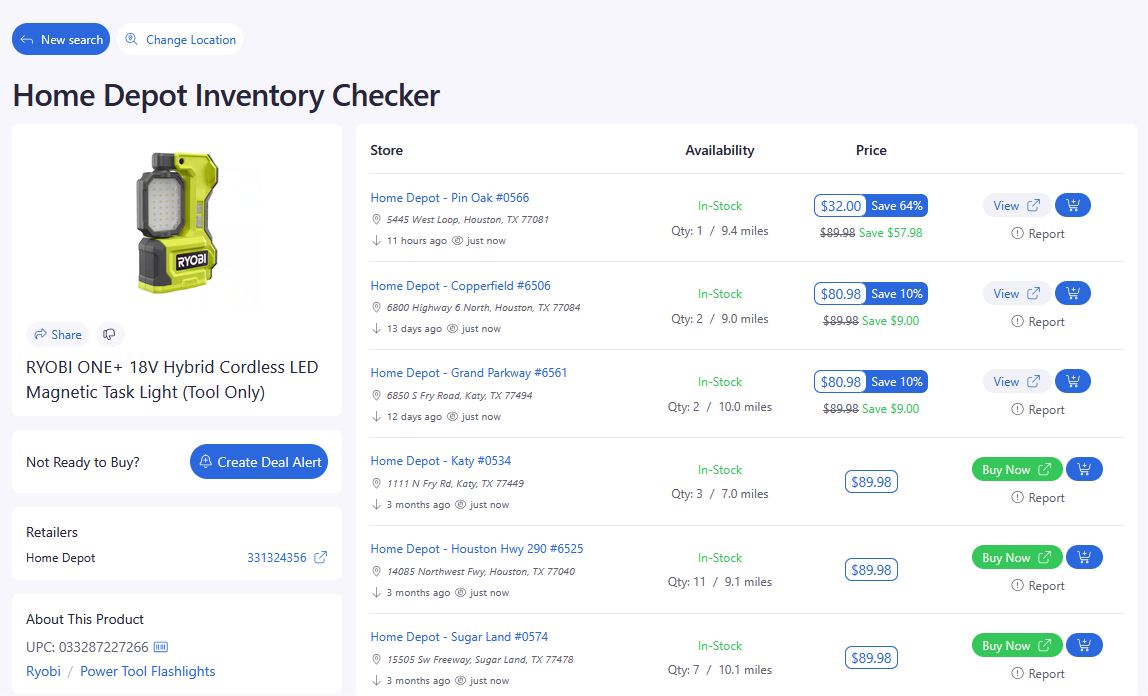
Once your search is complete, you'll see available information for nearby stores.
Depending on the retailer, results may include:
- Store location
- Current price
- Inventory status
- Distance
- Product details
This makes it easy to compare nearby locations without visiting each retailer individually.
Pro Tips
💡 Copying the product URL directly from the retailer's website is often the fastest way to search.
💡 UPCs are a great option when comparing the same product across multiple retailers.
💡 Inventory information changes frequently, so verify details before making a trip.
💡 If you're planning to visit multiple stores, compare pricing and availability first.
Frequently Asked Questions
Which retailers support Inventory Checkers?
BrickSeek offers Inventory Checkers for participating retailers. The retailers available may expand over time as new integrations are added.
Can I search by product name?
Inventory Checkers are designed to search using a product URL, UPC, or SKU for the most accurate results.
Is inventory guaranteed to be accurate?
Inventory information is provided based on the latest data available to BrickSeek. Because retailer inventory changes throughout the day, we recommend verifying availability before visiting the store.
Related Lessons
- Understanding Product Pages
- Searching by Product URL
- Searching by UPC & SKU
- Understanding Inventory Results