Browsing Categories & Retailers
Learn how category and retailer pages help you quickly focus on the products and stores that interest you most.
Browse Categories or Retailers
Sometimes you know exactly what you're shopping for.
Other times, you know where you want to shop.
BrickSeek makes both approaches easy by letting you browse deals by product category or by retailer.
Whether you're searching for power tools, patio furniture, toys, or electronics—or simply want to see everything available at your favorite retailer—these pages help you narrow your search.
Browse by Category
Category pages organize products into groups, making it easier to explore similar items.
Instead of scrolling through every available deal, you can focus on categories that match your interests.
Popular examples include:
- Tools
- Electronics
- Home Improvement
- Outdoor
- Kitchen
- Toys
- Seasonal
Browsing by category is a great way to discover products you may not have thought to search for individually.

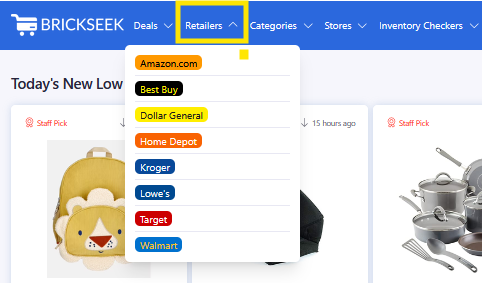
Browse by Retailer
If you prefer shopping at a particular retailer, retailer pages let you explore products from that store.
This is especially helpful when:
- You're planning a shopping trip.
- You have gift cards or rewards.
- You simply prefer certain retailers.
Each retailer page shows available products along with pricing and additional details.

Continue Exploring
Category and retailer pages work just like the rest of BrickSeek.
Click any product to open its Product Page, where you can:
- Compare pricing
- Review Pricing Insights
- View Community Scores
- Check inventory when available
- Visit the retailer's website
Every Product Page gives you the information you need to decide whether the deal is right for you.

Pro Tips
💡 Browse categories when you're looking for ideas.
💡 Browse retailers when you already know where you plan to shop.
💡 Combine browsing with filters to quickly narrow large product lists.
💡 Save interesting products to your Shopping List for future reference.
Frequently Asked Questions
Should I browse by category or retailer?
It depends on how you like to shop. Categories are ideal when you're looking for a type of product, while retailer pages are great when you're planning to shop at a specific store.
Can I still search for specific products?
Absolutely. Search is the fastest way to find a known product by keyword, UPC, SKU, or supported retailer URL.
Do category pages include local and online products?
Depending on the product and retailer, you may see both local and online opportunities. Open the Product Page to review all available offers.
Related Lessons
- Using Filters to Find Better Deals
- Finding Your First Deal
- Understanding Product Pages